
Flux AI Image Generator
Flux AI is an advanced text-to-image generation lineup from Black Forest Labs, designed for highly detailed prompt-driven image creation, versatile artistic styles, high-resolution output, and deeper generation control.
Explore Flux AI's Models
Jump straight into the exact model page you want to compare, test, or use for generation.
Flux AI's Feature Offerings
Common strengths surfaced across this provider's most relevant model families.
Revolutionary Text to Image Model
Flux uses a large-scale architecture designed for high-quality text-to-image generation, helping it produce rich image detail, stronger prompt adherence, and more diverse visual styles even when instructions are complex.
Prompt
A photorealistic portrait of Lingviana, a 36-year-old Spanish woman in a cozy university office, surrounded by warm wooden bookshelves. Soft, diffused lighting accentuates her expressive blue eyes and wavy dark brown hair, dressed in a light blouse and dark pants. She holds a leather notebook and fountain pen, exuding warmth in a rich, earthy-toned setting.
Output Image

Prompt
Pareidolic anamorphosis of a hole in a brick wall morphed into a hublot of a sail boat, a window to the sea.
Output Image

Prompt
A cat sit near the bech with sun glass, photo.
Output Image
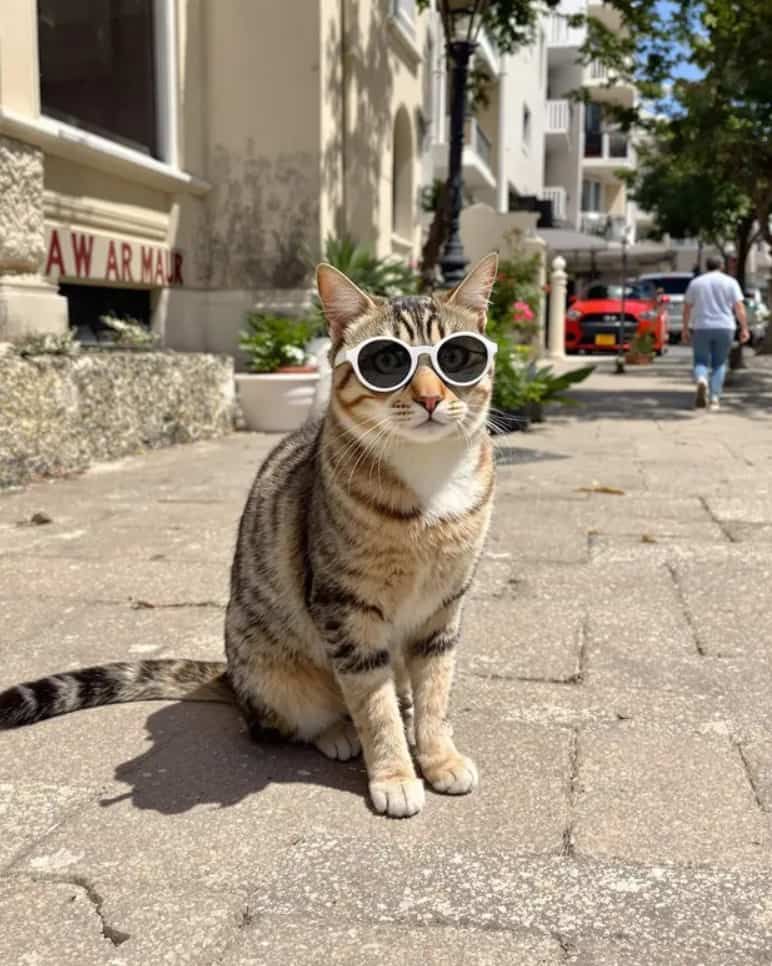
| Prompt | Output Image |
|---|---|
A photorealistic portrait of Lingviana, a 36-year-old Spanish woman in a cozy university office, surrounded by warm wooden bookshelves. Soft, diffused lighting accentuates her expressive blue eyes and wavy dark brown hair, dressed in a light blouse and dark pants. She holds a leather notebook and fountain pen, exuding warmth in a rich, earthy-toned setting. | |
Pareidolic anamorphosis of a hole in a brick wall morphed into a hublot of a sail boat, a window to the sea. | |
A cat sit near the bech with sun glass, photo. | |
Multiple Flux Model Variants
Flux is available in multiple variants across the wider model family. In this product, the currently integrated options are Flux Kontext and Flux 2 Pro, while the broader family also includes other public variants often used for faster or lighter-weight workflows.
Example 1
Version
Flux.1 Pro
Key Features
Top-tier performance with precise prompt understanding, high-quality visuals, rich details, and diverse outputs.
Use Cases
Commercial projects, professional design, and high-end visual content.
Example 2
Version
Flux.1 Dev
Key Features
Open-weight model derived from the higher-end Flux family and optimized for more efficient experimentation.
Use Cases
Academic research, personal development, and open-source collaboration.
Example 3
Version
Flux.1 Schnell
Key Features
Fastest and lightest Flux variant, designed for quicker generation and lower-friction iteration.
Use Cases
Rapid prototyping, education, and lower-resource environments.
Example 4
Version
Flux Kontext / Flux 2 Pro
Key Features
Integrated here for high-quality generation and efficient prompt-led iteration, balancing speed, clarity, and polished visual output.
Use Cases
Commercial design, concept art, polished illustrations, and fast iteration workflows.
| Version | Key Features | Use Cases |
|---|---|---|
Flux.1 Pro | Top-tier performance with precise prompt understanding, high-quality visuals, rich details, and diverse outputs. | Commercial projects, professional design, and high-end visual content. |
Flux.1 Dev | Open-weight model derived from the higher-end Flux family and optimized for more efficient experimentation. | Academic research, personal development, and open-source collaboration. |
Flux.1 Schnell | Fastest and lightest Flux variant, designed for quicker generation and lower-friction iteration. | Rapid prototyping, education, and lower-resource environments. |
Flux Kontext / Flux 2 Pro | Integrated here for high-quality generation and efficient prompt-led iteration, balancing speed, clarity, and polished visual output. | Commercial design, concept art, polished illustrations, and fast iteration workflows. |
Versatile Styles
Flux supports a wide variety of artistic styles and visual effects, making it suitable for creative directions that range from realistic rendering to anime, graphic illustration, and stylized concept art.
Prompt
Beautiful anime artwork, a cute anime catgirl that looks depressed holding a piece of paper with a smile drawn on it over her mouth, she is about to cry.
Generated Image

| Prompt | Generated Image |
|---|---|
Beautiful anime artwork, a cute anime catgirl that looks depressed holding a piece of paper with a smile drawn on it over her mouth, she is about to cry. | |
High-Resolution Output
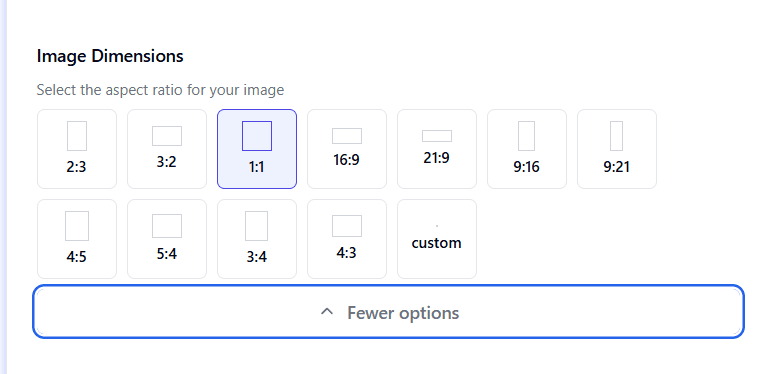
Flux can generate higher-resolution images across common aspect ratios such as 2:3, 1:1, 16:9, 9:16, 3:4, and 5:4, making it flexible for many downstream formats and use cases.
Many Customization Options
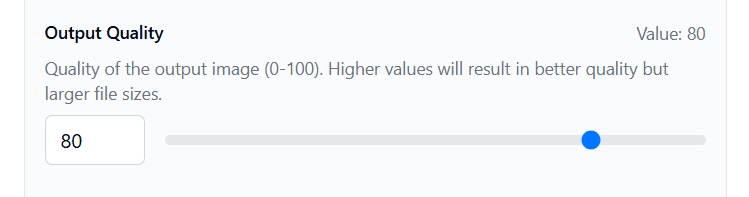
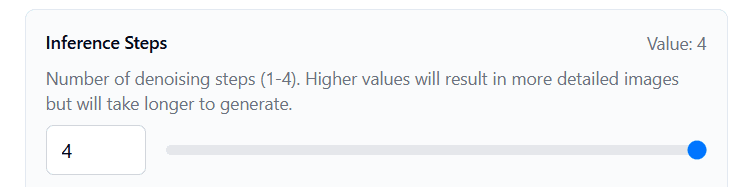
Users can adjust quality values and denoising steps to control how detailed the image becomes and how long generation takes, which is useful when balancing iteration speed against final polish.
Example 1
Setting
Output Quality
Description
Adjust image quality on a scale from 0 to 100 for more control over the final look.
Reference
Example 2
Setting
Denoising Steps
Description
Set denoising steps between 1 and 4. Higher values increase detail but take longer, while lower values favor faster generation.
Reference
| Setting | Description | Reference |
|---|---|---|
Output Quality | Adjust image quality on a scale from 0 to 100 for more control over the final look. | |
Denoising Steps | Set denoising steps between 1 and 4. Higher values increase detail but take longer, while lower values favor faster generation. | |
How to Use Flux AI on skills.video
01
Pick a Flux model
Choose the Flux model that matches your goal, using the integrated Flux options available here for high-quality direct generation or faster iteration.
02
Define the visual brief
Write a detailed prompt covering subject, style, composition, lighting, and mood so Flux can produce a stronger and more precise result.
03
Iterate to polish
Adjust quality and denoising settings as needed, then refine the prompt until the output reaches the detail, look, and consistency you want.
Image Models
Compare Flux AI image models for text-to-image and image editing workflows.
FAQs
Common questions about Flux AI models and workflows.